
Table of Contents
- I received Slider Revolution bundled with a WordPress theme. Can I still upgrade to access Premium features?
- How to add my address and VAT number to my invoice?
- What payment methods can I use?
- What happens if my subscription runs out?
- The support for my lifetime license ran out.How can I receive customer support?
- What is the difference between the license sold on Codecanyon and here?
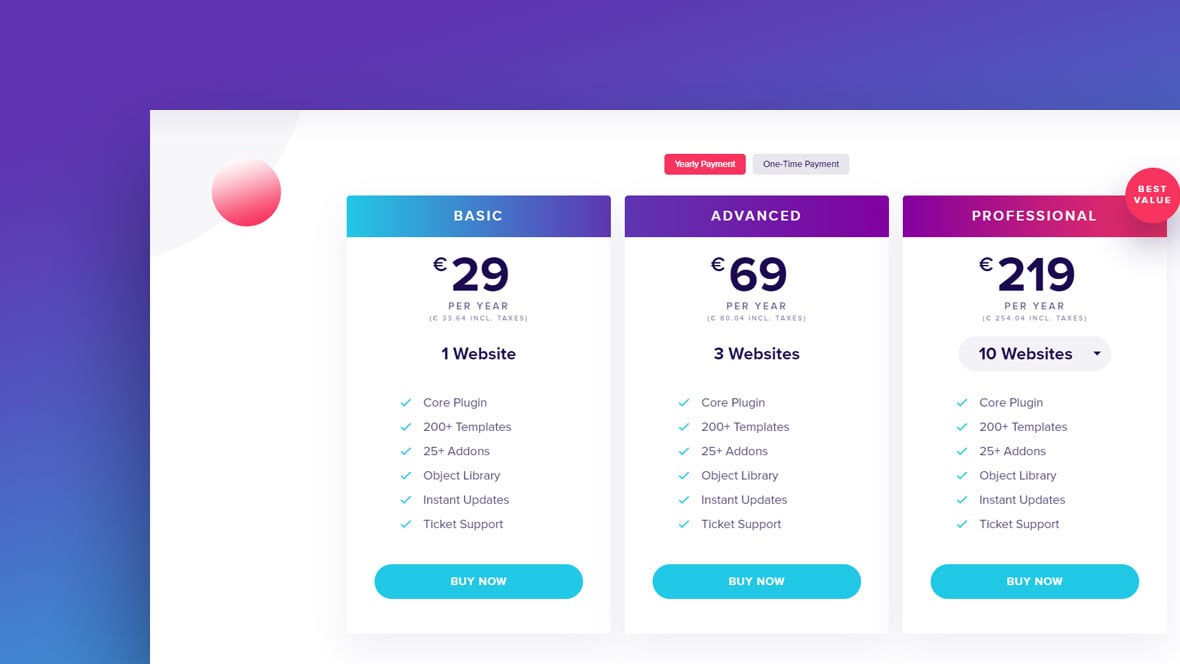
- What is the “One-Time Payment” license?
- What is the benefit of importing a CodeCanyon license?
- Can I use Slider Revolution for commercial projects?
- I want to include Slider Revolution in my theme. Which license do I need?
- I purchased a license. How do I get started with Slider Revolution?
I received Slider Revolution bundled with a WordPress theme. Can I still upgrade to access Premium features?
Yes! If you want to access all Premium features like the template library, addons, object library, updates and customer support, you can opt-in to one of our Licensing plans.
How to add my address and VAT number to my invoice?
Please follow this article from our FAQ section that was written with the VAT refund in mind but actually covers this topic too: https://www.sliderrevolution.com/faq/vat-refund/
What payment methods can I use?
We are using the secure and widespread payment processor Paddle. We currently support credit cards, PayPal and Apple Pay.
What happens if my subscription runs out?
If you cancel your subscription and it runs out, you will lose access to the Slider Revolution premium features like the template library, addons, object library, plugin updates, and customer support.
Renewing the subscription for this particular domain will let you regain access to all the features.
The support for my lifetime license ran out.How can I receive customer support?
In order to receive access to our Ticket support, you can purchase a one license subscription.
This will grant you access for one year or until you cancel the subscription and it expires.
As long as you have at least one active subscription in your account, you will be eligible for our Ticket support.
You can also consult our constantly updated Help center which will provide quick answers to almost any issue.
What is the difference between the license sold on Codecanyon and here?
The old Codecanyon license model offers access to most features at a fixed price, except for customer support which needs to be renewed every 6 months.
With the new subscription license model, we made sure to find a fair yearly price point, with Everything included.
For more information on licensing, please take a look at our Licensing terms.
Check out the next question to see the “One-Time Payment” license being explained.
What is the “One-Time Payment” license?
Our “One-Time Payment” license, is essentially a discounted version of the CodeCanyon regular license.
Similar to the CodeCanyon license, with our “One-Time Payment” license, you pay once and get access to all Slider Revolution Premium features and 6 months of ticket support.
What is the benefit of importing a CodeCanyon license?
You are able to manage all licenses comfortably through our dashboard.
Additionally, after Importing licenses purchased on CodeCanyon, you will receive a one-time use special offer:
You can purchase any subscription plan or a one-time payment license with a 20% discount in the first year.
Can I use Slider Revolution for commercial projects?
Yes. Slider Revolution, including all templates and assets, can be used in your commercial projects.
Please take a look at our Terms & Conditions for more information.
Learn more about Slider Revolution in our Help Center.
I want to include Slider Revolution in my theme. Which license do I need?
Bundling Slider Revolution with a theme/template can be done with an extended license.
One extended license is required per theme /template, you want to include Slider Revolution in.
Please read more on our Licensing page.
I purchased a license. How do I get started with Slider Revolution?
Our powerful Help center offers all kinds of resources to answer any question you might have about Slider Revolution:
The brand new manual, FAQs, video tutorials, definitions, version history, and support ticket center will make sure you are not feeling stranded at any point.
For beginners, we recommend starting with the Quick Setup part of our manual.





Hi, is “one time payment” a lifetime payment? you did not specify that.
Hi there!
Yes, the “one time payment” license is essentially a lifetime license where you pay once and get access to all premium features, updates and 6 months of customer support (similar to the Codecanyon regular license).
Cheers,
Moritz
Hi,
I have purchased 1 license but want to convert that to the 3 website “forever” license. Can I do that?
Can I transfer a license from one site to another? example: client goes out of business and no longer needs the site (and slider).
Hello,
I assume that you purchased a 1 license subscription?
As far as transfering licenses is concerned: You can reset each individual license key and register it on another domain with the “reset” button next to the license. Note that there is
Currently there is no way to convert a specific license to a larger plan, but you can have any combination of plans.
Here are at least two options that I see for you:
1. The “one-time payment” license includes all features forever and 6 months of ticket support access. If you have at least one running subscription though, you will always have access to our ticket support.
This would of course also apply to a 3 website “one-time payment” license.
2. If you are good with the running year of ticket support for now, you can also cancel the 1 website subscription and add the 3 website “one-time payment” license.
I hope that this was helpful!
Cheers,
Moritz
Hello,
I am using slider revolution on one of my clients website (in build). He likes the slider with the footage of the ocean waves. Under “Can I use Slider Revolution for commercial projects?” you say “Yes. Slider Revolution, including all templates and assets, can be used in your commercial projects.
Please take a look at our Terms & Conditions for more information.”
Though I also looked up in the Terms&Conditions, but can’t find the fitting information. Can you give me a hint please?
BR,
Sebastian Hasenöhrl
Hi,
sorry for the confusion!
Generally you can use all assets in the Slider Revolution libraries (Templates, objects…) for all of your commercial and non-commercial projects. We will make this more clear in the T&Cs too!
Cheers, Dirk
Hello Dirk,
Thanks a lot for that clear comment!
BR,
Sebastian
Hi, If I purchase the 1 year license and then I don’t renew it a year later, will the sliders created during the licensed year be affected?
Hi Niko,
the modules using AddOns won’t work anymore. Other than that everything will work.
Having no updates and support might be not very comfortable though.
Cheers, Dirk
How do you handle Pantheon WP hosting, where we have 3 environments: Dev, Test, and Live? It is one site, but requires installation on each environment.
Hi Daniel,
we have an automatic recognition in place that will work with the same key for your staging and dev domains as your actual domain. So you need only one key for all domains of your dev process as long as they fit the following patterns. Let me know if that fits Pantheon WP hosting’s requirements!
Exact domain matches
* localhost
* apache
* wordpress
* local
* cloudwaysapps.com
* cloudwaysapp.com
* wpengine.com
* stagingweb.net
* myftpupload.com
* temp.domains
* gridserver.com
* cloudapp.net
* pantheonsite.io
* azure.com
* pairsite.com
* flywheelsites.com
* smarthost.pl
* azurewebsites.net
* beget.tech
* webspaceconfig.de
* w3pcloud.com
* lndo.site
* wpserveur.net
* kinsta.com
* kinsta.cloud
* flywheelstaging.com
* wpstagecoach.com
* dev.cc
* IP domains (e.g. 111.111.111.111)
* myraidbox.de
* accessdomain.com
* amazonaws.com
* sg-host.com
* cloudaccess.host
* dream.press
* your-server.de
In addition if your development domain ends with any of the domains above, you’re also eligible for a free license.
Development domain starts with
* dev.
* dev[numbers]. (e.g. dev3.website.com)
* dev-
* local.
* webdev.
* site[numbers]. (e.g. site02.website.com)
* stage[numbers]. (e.g. stage25.example.com)
* staging[numbers]. (e.g. staging25.example.com)
* dev[number][anything].*.* (e.g. dev123-xy.example.com)
Development domain contains
* -development.
* -local.
* -staging.
* -test.
* staging
* wpengine
* testsite
* .sites.
* dev.
* devsite
* .[anything]dev.
* debug.
* stage.
Development domain ends with
* .dev
* .test
* .localdev
* -liquidwebsites.com
* .docksal
* .loc
* .wpmudev.host
* .testurl.ws
Cheers, Dirk @ Slider Revolution
Hello i have a license purchased on envato a few years ago. I deregister it from a old website (which is no more online) and I’m trying to register it on another website, but it keeps saying “license key is invalid”
I can see the license in my dashboard on your site. I can’t submit a ticket because the support is expired, so i’m stuck
Hi,
thanks so much for using our plugin!
You can use our new dashboard for this. To import CodeCanyon/Envato licenses to our system please follow this explanation:
https://www.sliderrevolution.com/faq/how-to-import-codecanyon-licenses/
Or you can use this webform to force a reset:
https://www.themepunch.com/purchase-code-deactivation/
Just for info: In case you did not know (please ignore if you do know already;)): You will need a single regular license purchase code for every single installation to keep legal and updated. Thanks!
Cheers,
Dirk @ Slider Revolution
I read a similar answer but is for lifetime licensing… I just want to confirm: There is no way for upgrade a 1-site yearly license to a 3-sites yearly license?
Hi Ricardo,
I just sent you an email.
Cheers, Dirk @ Slider Revolution
I purchased from Code-Canyon in 2016. WordPress site admin area not accessible after recent WP upgrade. Says it is the Slider Revolution app. Noticed a while back I was getting messages that the app was de-registered manually. I don’t intend to change anything with the slider, but i would hate to lose all my hard work by purchasing a registration.
Hello,
thanks for contacting us! Your request requires one of our support agents to have a closer look.
In order to give our clients the best support possible, we are having a support ticket system reachable via the link below.
Please use it for your upcoming questions concerning one of our products. This will guarantee the fastest answer possible. Support requests here cannot be answered, unfortunately. Thank you!
Please use our ticket systems over at:
https://support.sliderrevolution.com or [email protected]
Cheers Dirk @ Slider Revolution
can i buy one license and use for unlimited domain and websites?
Hi,
thanks for the interest in our plugin! It is one license for one domain/website (3 for 3 websites etc.).
Cheers, Dirk @ Slider Revolution
Hi there! Slider Revolution was embedded in a wordpress them that I bought called iBid. I then bought a one time licence for Slider Revolution. Now when I change anything in a demo file and try to preview it, I get the error message: “The preview could not be loaded due to some conflict with another wordpress theme or plugin”. Is there any way to see which plugin is the conflicting plugin?
Thank you!
Hello,
thanks for contacting us! There is only the manual way described here: https://www.sliderrevolution.com/faq/how-to-test-for-conflicts/
Or one of our support agents could have a closer look. In that case please raise a ticket at https://support.sliderrevolution.com .
Cheers Dirk @ Slider Revolution
Hi!
Slider Revolution Pro or licenced runs/load faster than the free version? (I received SR bundled with a WordPress theme)
Hi,
the engine is the same. The difference, in your particular case, is that our 1-on-1 support could try to help you speed your Slider/WP installation/theme up.
Cheers, Dirk @ Slider Revolution
Hello I understand that it’s one licence per site, but about WordPress multisites? Does it consider it 1 instalation? And how easy is it to migrate change across the multisite?
Thanks
Hi Luis,
please check out this article https://www.sliderrevolution.com/faq/revolution-slider-multisite-installation-activation-and-updates/ as it covers this topic.
If you have more detailed questions please do not hesitate to write to [email protected] !
Cheers, Dirk @ Slider Revolution
Hi,
Is it possible to use one license for both test and production sites, when live url is https://example.com and the test environment https://test.example.com. (word “test” without – in front)
Georgia
Hi,
yes, test in front of your domain will work and you need no extra license for it. More details about all staging/testing/developing domains: https://www.sliderrevolution.com/faq/licensing-information-for-staging-sites-and-localhost/
Cheers, Dirk @ Slider Revolution
Good Day!
I have inherited my church’s website on WordPress, and it is getting an error that comes from SliderRevolution. I have Version 5.3.1.5.
What is the current release? I am assuming this is a free version. Do you still support this version? Does it have updates I can retrieve and install?
It appears that you offer a paid subscription for this plugin. How would I convert to the new code using WordPress?
Hi,
current version is 6.6. So you inherited quite an old version. You either ask the theme author for an update or check out our subscriptions here on this site. Jumping from such an old version to the current one could cause smaller issues(layers behaving differently maybe) but our support team at https://support.sliderrevolution.com is there for you.
Cheers, Dirk @ Slider Revolution
Hi! I want to get Slider Revolution for a client, but want to try Slider Revolution on a test domain and if all is fine then transfer the plugin and the slides to the client domain. Would this be easy? I don’t want to be forced to purchase the plug-in twice for the client domain and the test domain. Thanks!
Yes, sure! You can transfer the license from your server to the client’s server. If you have a dev or test domain you could even have one license active on both servers: https://www.sliderrevolution.com/faq/licensing-information-for-staging-sites-and-localhost/
Cheers, Dirk @ Slider Revolution
Are subdomains treated as 1 separate website? In other words, if I purchase a license for xyz.com, would it apply to all its subdomains?
Hello,
Thank you for your question. In terms of licensing, each subdomain is considered a separate website. So, if you purchase a license for xyz.com, it wouldn’t automatically apply to its subdomains such as subdomain.xyz.com.
We understand that different projects may have different needs, so we’re here to support you in finding the best solution for your requirements. If you’re planning to use our plugin across multiple subdomains, you might want to consider our extended licenses, which allow for usage across multiple websites. For more details, please check out our licensing page or feel free to contact our support team.
Thank you for considering Slider Revolution for your project. We’re excited to help bring your vision to life!
Best Regards, Dirk @ Slider Revolution
Hello, can i develop sliders with one licence and then integrate slider in differents web sites? Thank you
Hello,
Thank you for reaching out with your question! The license for Slider Revolution is intended for use on a single website. If you wish to integrate the slider into multiple websites, you would need to purchase separate licenses for each one.
However, if you are developing multiple sites for your own use or for a single client, we do offer extended licenses that might be more cost-effective for you. Please check out our licensing options at https://www.sliderrevolution.com/pricing for more details.
If you have any more questions or need further clarification, please don’t hesitate to ask. We’re here to help!
Best regards,
Dirk @ Slider Revolution