

How to Get SR7
Slider Revolution 7 is free for every site. A subscription adds the premium features. All subscriptions include the same premium features, with plans for different numbers of websites.

Upgrading to SR7 is different depending on if you:
- Are already subscribed
- Have a One-Time / CodeCanyon license
- Are a theme author
- Received Slider Revolution bundled with a theme
Already Subscribed?
If you already have a subscription you can upgrade to SR7 with premium features right away.
- No plan change is required.
- The upgrade isn't automatic. You can upgrade to SR7 when you're ready.
SR6 gets security fixes until 1 March 2028.
One-Time / CodeCanyon License?
You can update to SR7 for free. Premium features in SR7 need an annual license, and as a one-time or CodeCanyon customer you get 50% off its first year, once per license, for six months.
Read more about one-time licenses here.
How to get the 50% offer?
Open the offer from the Slider Revolution dashboard, or in your account at account.sliderrevolution.com. In your account, the steps are as follows.
Step 1: Login to your member dashboard.

If you have an existing account and can't remember your login details, see here for help.
CodeCanyon licenses can be imported into your account; that is how you get the 50% offer.
If you don't yet have an account, and have a license from CodeCanyon you didn't previously import, choose Import CodeCanyon License at the account sign in page.

Step 2: On the card for your one-time or CodeCanyon license, click the Upgrade with 50% off button. The usual Upgrade button in the sidebar does not apply the discount.
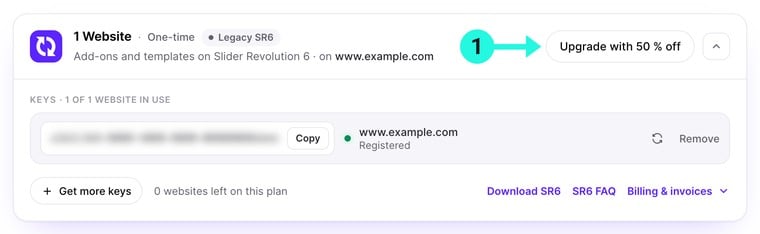
Step 3: Choose your preferred plan, with the 50% discount already applied, and proceed with your subscription.
Current or New Site?
Note that you don't have to use your SR7 key on your existing SR6 site.
If you prefer, you can use it on a new site and keep your old site running SR6. SR6 gets security fixes until 1 March 2028.
If you wish to use your SR7 key on a new site, you can stop reading this tutorial and instead follow our Setup Guide to get started.
Otherwise, if you wish to upgrade your current site, replace your SR6 key with your SR7 key, then proceed to the SR7 upgrade process.
Theme Author?
You are allowed to bundle SR7 with your theme.
To activate premium features, each domain needs its own license key. However, your theme users can still benefit from the full new SR7 visual editor and all included core features.
If your theme already bundles Slider Revolution 6.x.x: We encourage you to invite your customers to update to 6.8.0 as their first action, to ensure any required data migration is handled in the safest possible way.
To push out an upgrade to SR7, you can download the new plugin from your member dashboard, and distribute it as part of a theme update.

Extended License Import
If you hold an extended CodeCanyon licence, the site where that key is registered will be able to access premium SR7 features.
If you have not created an account on our website yet, and you have an extended CodeCanyon licence that has not been imported before, select Import CodeCanyon License on the sign-in page.
Future Theme Releases
Note that for your future, new theme releases you only need a Starter plan subscription in order to bundle SR7 in with your work. Your theme users get SR7 and its updates for free. Premium features need their own license.
Plugin Bundled with Theme?
Your plugin dashboard offers an update to 6.8.0, the latest SR6 version. Apply that update first.
After updating, click Register for free and update and confirm your email address. Your site then updates to SR7 for free, and no subscription is needed.
This option opens for theme sites in stages over the weeks after launch.
SR7 Upgrade Process
The upgrade to SR7 is seamless, and requires only two steps.
First, update to 6.8.0 to prepare your site, then proceed to upgrade to SR7.
Update to 6.8.0
Update to SR6 6.8.0 as your first step.
Version 6.8.0 prepares all your modules, and then offers SR7.
When your plugin is updated to 6.8.0 you should see "Installed Version 6.8.0" 1 in the dashboard Plugin Updates section.
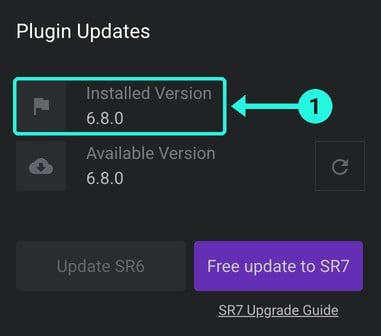
If you didn't previously migrate your modules to the Velocity frontend engine we released in 2024, migration will be handled automatically for you by the 6.8.0 update.
Note: If you need any assistance with the module migration process head over to our SR6 Archive: Velocity Frontend Engine Update.
Once you've updated to version 6.8.0, you are ready to upgrade to SR7.
Upgrade to SR7
Important Note
Upgrading to SR7 is not easily reversible.
Please ensure you have performed necessary backups and migrations before proceeding.
If you do need to go back, see Reverting to SR6.
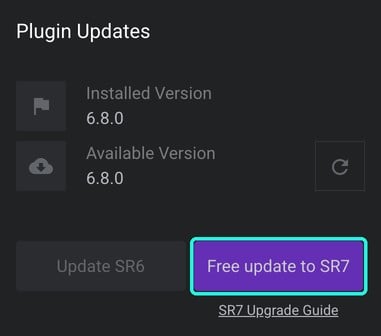
Step 1: In the dashboard's Plugin Updates section, click the Free update to SR7 button.
Step 2: In the Free Update panel that opens, click Update to SR7. Your SR6 data stays as a backup.
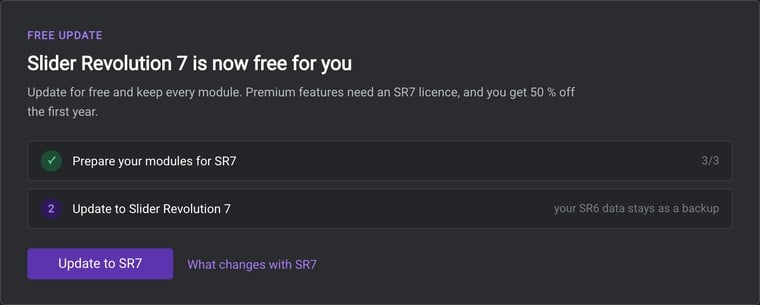
Slider Revolution will seamlessly handle the upgrade for you in the background.
Step 3: When the upgrade completes, head over to the SR7 Editor tour to learn what's changed, and get started with the new version!
Reverting to SR6
If you have upgraded to SR7 and need to return to Slider Revolution 6, you can reinstall SR6 in place of SR7.
Your SR6 modules stay untouched in the database until the Delete Unmigrated Modules button is used. A one-time or CodeCanyon license key stays valid for SR6.
Changes you make in SR7 stay in SR7 and do not appear in SR6.
Important Note
The Delete Unmigrated Modules button in SR7's Global Settings removes your SR6 data permanently. Do not use it while you might want to go back.
To reinstall SR6, follow these steps.
Step 1: Download Slider Revolution 6 from your dashboard at account.sliderrevolution.com.
Step 2: If you use Slider Revolution add-ons, go to Plugins and click Deactivate under each add-on.
Step 3: On the same screen, click Deactivate under Slider Revolution 7, then click Delete.
Your modules stay in the database.
Step 4: Go to Plugins -> Add Plugin and click the Upload Plugin button.
Step 5: Choose the SR6 zip file and click Install Now.
Step 6: Click Activate Plugin.
SR6 is active again. It installs its own versions of the add-ons from its add-ons page.
Step 7: If SR6 asks for your license key, enter it again.
SR6 then works as it did before the update. SR6 gets security fixes until 1 March 2028.
