



Why Should You
Use This Slider Revolution Template?
We’ll give you 3 very good reasons…
Instantly Captures Visitors’ Attention
Half of the battle in getting people to engage with your website lies in getting them to stop and pay attention to your content. Your visitors aren’t likely to encounter websites that use a cool slider like this one, so consider the battle won.Customizations As Easy As 1-2-3
You might be looking at this Slider Revolution template and wondering how the heck you’re going to repurpose it for your needs. Don’t worry. Whether you want to edit the logo, change the images, or add new text to the sliders, it can easily be done within minutes.Wide Range Of Use Cases
The beauty of this Slider Revolution template is you can use it for a wide variety of websites and business purposes. You can… show off your products. Tell your brand’s story. And much more!Slider Revolution Slider Template
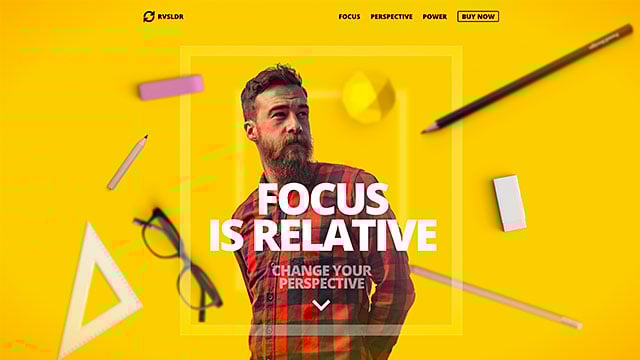
Focus Parallax Slider
A full-screen Slider Revolution Template with mouse controlled parallax effects for your WordPress header.
Slider Revolution Templates Are
100%
Responsive
We designed the Focus Parallax Slider to look good no matter what device your visitors are on.
We’ve also given you an easy-to-use responsive editor that allows you to edit and preview your Slider Revolution module from different views.
There’s More
To This Template Than What You Can See
It’s not just a beautifully designed slider or jaw-dropping animations that make this template — or any of Slider Revolution’s 250+ templates — special.
Compatibility
This slider template is compatible with popular WordPress plugins — like WooCommerce — so you have a ton of flexibility and control over what you can do with it.Support
Slider Revolution comes with dedicated 1-on-1 VIP support. If you run into any problems with the plugin, website or slider templates, our tech wizards will help resolve your issues ASAP.Speed
Page loading speeds can significantly impact how well your website ranks. That’s why all of our templates are built for speed. If you want to give them an extra boost, our optimization guide will show you how to optimize them further.Get The Most
Out Of This Slider Template
Our in-depth resources will provide you with knowledge and instant solutions.
Check out our comprehensive beginners guide to installing templates.
Our user manual starts with installing and registering Slider Revolution. From there, you will learn everything you need to know in order to work with the editor.
Whether you are a new or advanced user, you will surely get some knowledge out of our manual.
Learn how to edit text, links and images:
Basic Module Editing Guide
Learn how to swap videos & customize colors:
Intermediate Template Editing Guide
The fundamentals of animation in Slider Revolution:
Animation Fundamentals
Instantly find solutions to the most commmon issues and follow in-depth tutorials:
FAQs & Tutorials
Watch practical, step-by-step exercises in our video guides section:
Video Guides



From The Blog
Creative CSS Link Styles Examples for Eye-Catching Sites
ResourcesCSS Ripple Effect Examples for Modern Websites
ResourcesHow to Create an Employee Spotlight Presentation Using a Website Slider [Tutorial]
TutorialsPopular Resources
Optimizing Load Speed and Performance
FAQQuick Setup – Slider Revolution
FAQCreate a Basic Responsive Slider
Video TutorialGet Productive Fast
ManualNewsletter

Join over 35.000 others on the Slider Revolution email list to get access to the latest news and exclusive content.