

Sliders are like window displays of the digital storefront—every scroll is an invitation to explore more. Think of them as the silent narrators of your website’s story, melding visuals and content that whisper, “Hey, there’s more to see!” But here’s the scoop: not all sliders are crafted equal. Divi slider alternatives? Yeah, we need to chat about those.
In the realm of web design, flexibility is your best bud. The Divi slider has flair, sure. But there’s a cosmos of choices out there, each with its own set of starry features. Variety is the spice of the internet, and trust me, your website’s taste buds are yearning for it.
By the time you’re done here, you’ll be a guru in the alternatives to Divi’s slider—knowing when to switch, why it matters, and how it will completely uplift your site’s interaction game.
Prepared to dive deep?
We’ve got a list of next-gen WordPress carousel plugins and slick slider WordPress options—all set to give your site’s front page that punchy dynamic vibe.
No fluff. Just the straight-up goodies on visual page builders and your ride to a standout site experience. Read on for the rockstars of sliding magic!
Divi Slider Alternatives
| Slider/Plugin | Platform Compatibility | Responsiveness & Unique Features |
|---|---|---|
| Slider Revolution | WordPress, Shopify, Magento, Prestashop, OpenCart, Typo3 | Fully responsive; rich layer animation; multimedia content; slide library |
| LayerSlider | WordPress | Responsive; multi-purpose with animation and slide editing capabilities |
| Wonder Slider | WordPress | Responsive; supports images, videos; 3D carousel feature |
| RoyalSlider | WordPress, jQuery | Responsive; focuses on performance; touch-friendly; deep linking |
| Master Slider | WordPress | Responsive; touch navigation; smooth transitions; layer parallax |
| Soliloquy | WordPress | Responsive; lightweight; drag-and-drop builder; SEO friendly |
| Slide Anything | WordPress | Responsive; slides any content; carousel features; touch and drag support |
| Ultimate Responsive Image Slider | WordPress | Responsive; unlimited image upload; multiple sliders possible |
| Smart Slider 3 | WordPress, Joomla | Fully responsive; dynamic slides; layer animation; page builder friendly |
| Toolset | WordPress | Responsive; allows to build sliders without coding; integrates with Types |
| Crelly Slider | WordPress | Responsive; layers with animations; free to use |
| SlideDeck | WordPress | Responsive; slider creation without coding; customizable layers |
Slider Revolution

Slider Revolution is your secret weapon to creating responsive WordPress sliders, web pages & stunning visuals even with zero experience.
Exceed even the most unrealistic expectations with special effects, animations, and impressive designs. All at your fingertips in our drag-and-drop intuitive editor.
There are 200+ templates to get you started on your responsive content. These customizable templates are NOT just for WordPress responsive sliders, but also for hero sections, web pages, WooCommerce content, and other content elements.

You’ll be able to create everything a pro can do without writing a line of code.
Once you open your eyes to the immense possibilities our template library offers you, you’ll never have to deal with the limitations of an average WordPress slider plugin ever again.
Did we mention there’s a 2000+ elements library that you can use to turn your raw ideas into stunning visuals?
You’ve got a royalty-free media library at your fingertips all included in this cutting-edge WordPress slider plugin: background images, videos, object PNGs, font icons & SVGs, premade layer groups, and many more.

Slider Revolution is the cutting-edge WordPress plugin for today’s sky-high web design demands. Packed with sleek features, it can turn boring and static designs into visually-grabbing, responsive websites with just a few clicks.
Check it out and see for yourself!
LayerSlider

Another high-quality plugin is LayerSlider. It creates sliders and slideshows with advanced animation effects.
LayerSlider has a handy drag-and-drop builder with many templates and ready-made transitions. The lazy load option ensures that your pages load fast.
You can copy, paste, and access the Adobe Creative Cloud if you want to modify the slide images in the editor.
Layer Slider’s more recent versions emphasize popups. Now, you can make professional-looking popups with sliders using this unique WordPress slider plugin feature.
Wonder Slider

The following plugin is simple yet responsive. Wonder Slider comes as a premium or a free version. However, the free version adds a watermark to the slide images linked to the Wonder Slider website.
You can enhance your slider module with images, videos (mp4, Vimeo, and Youtube), and WordPress posts. Slider settings for vertical and horizontal slideshows have embedded thumbnails. This plugin makes adding a slideshow or slider to your WordPress site very straightforward.
With Wonder Slider, you can add amazing animated transition effects to your slider modules. Lightbox effects draw your visitors’ attention to the slider’s content. And the handiest feature is the wizard user interface that guides you through the entire process.
RoyalSlider

RoyalSlider is a perfect SEO-optimized slider tool with an intuitive user interface. It provides high-performance sliders with touch slider options for easy mobile navigation.
Slider modules can hold Flickr and Instagram images. You can also use pictures from your blog posts or WooCommerce store.
Apart from images, you can add Vimeo or Youtube videos for fantastic video galleries. The lazy loading option ensures your pages will load fast despite the heavy slider content, making many sliders per page possible.
Master Slider

Master Slider allows you to make touch slider modules focusing on mobile users. The free version only has basic features, but you can still make beautiful sliders with it.
This Divi Slider alternative has a drag-and-drop editor that shows how your slider will look live. The preloading capabilities are lightweight and fast-loading.
This plugin creates interactive and dynamic slider modules with more than six slide image transitions. And it supports CSS3 and jQuery. Some of Master Slider’s principal features are:
- Sliders with tabs and thumbnails
- Intuitive interface
- Unlimited touch-enabled slides
- Multiple templates
Soliloquy

Soliloquy is a lightweight and easy-to-use alternative to Divi Slider that is 100% responsive. Its excellent integration with the WordPress Dashboard uses images from your media library. So you do not have to upload your files manually.
Its WordPress coding guideline makes it easy to work with for WordPress users. It blends into your WordPress admin area, and the intuitive interface does not require much explanation.
It resizes images and picks the best slider theme, styles, and other settings for you if you want. Then press the Publish button to save your slider.
Slide Anything
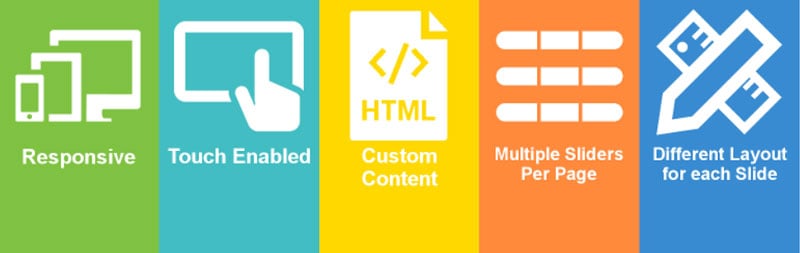
Like its name says, you can put anything in your slider module with Slide Anything. This includes images, HTML, text, videos, and just about anything else.
However, Slide Anything is not as intuitive as other examples in this post. And other slider tools can also add different media types to a slider module.
HTML editor is the only editor in Slide Anything, making it confusing for beginners without coding experience.
Ultimate Responsive Image Slider

Ultimate Responsive Image Slider is what it says it is, a responsive plugin for making photo sliders. Many WordPress bloggers love this slider tool.
It uses a practical drag-and-drop editor, so you do not need a lot of experience to make the desired presentation. Since it does not ask for coding, you don’t have to worry about how your coding skills rate. And the results look awesome in any browser and on any device.
You can increase your visibility in search engines by setting a different tag for each item in the slider. It’s also easy to select the thumbnail size, position, and slider distance.
Smart Slider 3

This robust WordPress image slider builder offers a free version. And you can make SEO-optimized and responsive sliders with it. Smart Slider 3’s free version also includes the dynamic posts slider to feature your latest posts.
The premium version lets you modify your sliders like a page builder. Smart Slider 3 has a drag-and-drop builder and can handle six layers.
This Divi Slider alternative makes your slider faster and more straightforward.
Toolset
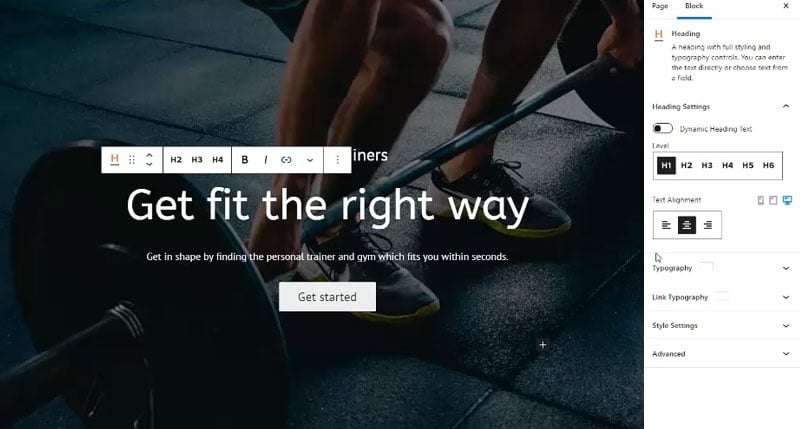
Toolset has everything you need to make an impressive slider for your WordPress website. Real estate agents will especially benefit from sliders that show relevant images of the properties they offer. To do that, Toolset can create a dynamic slider in a few minutes.
You can overlay the slide background image with other content for more details. And you can control your slider module’s look.
Toolset is easy to work with, even for the beginner. For example, you can make a complete dynamic slider without typing a single line of code.
Crelly Slider

Crelly Slider can create layers for sliders. Images, text, and videos are easy to add with the handy drag-and-drop builder.
Most slider plugins can add integrated element animations, like the ones in PowerPoint. Crelly Slider was one of the first to add this feature to their slider builder.
This Divi builder alternative is 100% responsive. So you can be sure your slider will look perfect on desktops and mobile devices, whether Android, iOS, or another device. Developers also have the freedom to expand Crelly Slider’s functionalities.
SlideDeck

The last Divi Slider alternative is the SlideDeck plugin. It is robust, uncomplicated, and the responsive sliders look amazing on any device.
SlideDeck makes full-width sliders that show off your content. And the swipe option makes mobile device navigation quick and straightforward.
The content sourcing option’s most exciting feature can take content from social media sites like Vimeo and Youtube and add it to your slider. SlideDeck also lets you customize all slider elements, like font, size, and colors.
FAQ about Divi Slider Alternatives
Why seek Divi slider alternatives?
Sure, Divi’s cool, but say you want something fresher, something that spices up your users’ scrolling experience. You might crave features like unique animations or better performance. Alternatives can revamp that not-so-new Divi slider, keeping your site’s look on-trend and user-friendly.
Are there free options that can do what Divi slider does?
Absolutely. There’s no shortage of free plugins that can match Divi’s prowess. Smart Slider 3 and MetaSlider come to mind. They pack a punch without the price tag, making them sweet for budget-conscious site craftspeople.
What features should I look for in a Divi slider alternative?
When window shopping for slider plugins, keep your eyes peeled for mobile responsiveness—it’s a must. Look for smooth animations, easy customization, and if you’re into the fancy stuff, consider options for layering and interactive elements. Not just a pretty face but a real heavyweight.
How easy is it to implement a Divi slider alternative?
Piece of cake, mostly. WordPress is neat like that—plugins are made to play nice. If you can navigate Divi, you can handle the install for something like Revolution Slider or LayerSlider. And with the help of tutorials, you’ll handle these like you crafted them yourself.
Can I import my existing Divi slider content into an alternative slider?
Here’s the score: some plugins offer import tools—yep, you won’t start from scratch. They might need a tweak or two afterward, but you’re not rewriting your epic saga, just changing the paper it’s printed on.
Will changing to an alternative slider affect my site’s SEO?
Short answer: there’s potential. A speedy, performance-optimized slider can make your site quicker, and we all know speed’s a heavyweight in SEO’s ring. Just choose wisely—whatever’s slick for users is slick for SEO mojo.
How do I test the performance of a slider plugin?
Get down with tools like Google’s PageSpeed Insights or GTmetrix. They’ll give you the lowdown on loading times. Remember, the internet’s no patience game—slow sliders might scare off your visitors.
Will Divi slider alternatives work with my custom themes?
Mostly, yes. These slider wizards are built to mingle with any WordPress theme that plays by the rules. Check for cross-browser compatibility too, so everyone’s in on the fun, regardless of their portal to the webiverse.
Are Divi slider alternatives better for mobile compatibility?
Some are like ninjas—slick, fast, and they adapt like it’s their day job. Mobile’s king these days, so it pays to pick a plugin that makes your mobile visitors’ experiences smooth.
Can I still use the Divi builder with a different slider plugin?
Sure thing. Divi’s pretty open-minded when it comes to third-party tag-alongs. Slot in your plugin of choice, and it’ll nestle right in with the rest of your Divi-built content, like it was always meant to be there.
Conclusion
Diving into a sea of Divi slider alternatives certainly sets the stage for an epic website adventure. It’s a digital quest for the slick, the speedy, the snazzy. We’ve trudged through the tech jungle and emerged with glittering treasures—plugins that make your content pop and dance across screens, big and small.
So, what did we uncover?
- A caravan of visual page builders ready to redefine the user experience.
- A fest of interactive modules that have users swiping and tapping for more.
- WordPress carousel plugins that serve up dazzling visuals without a hitch.
And remember, this isn’t goodbye. It’s more like a “See ya on the other side!”—the side where your site shines brighter because you chose a slider that sings in harmony with your vision.
The right plugin won’t just display content; it’ll catapult it to new heights, making every visit a performance, not just a pit-stop. Time to slide into a new chapter of your web story!
If you liked this article about plugins better than the Divi slider, you should check out this article about websites with carousels.
There are also similar articles discussing plugins better than the Elementor slider, testimonial carousels, LayerSlider alternatives, and the best WordPress sliders.
And let’s not forget about articles on WooCommerce slider plugins, WordPress logo slider plugins, carousel sliders, and full-page sliders.